Eliminate data entry to cut your PO processing time by 90%. Field Materials automatically syncs POs to your accounting software.
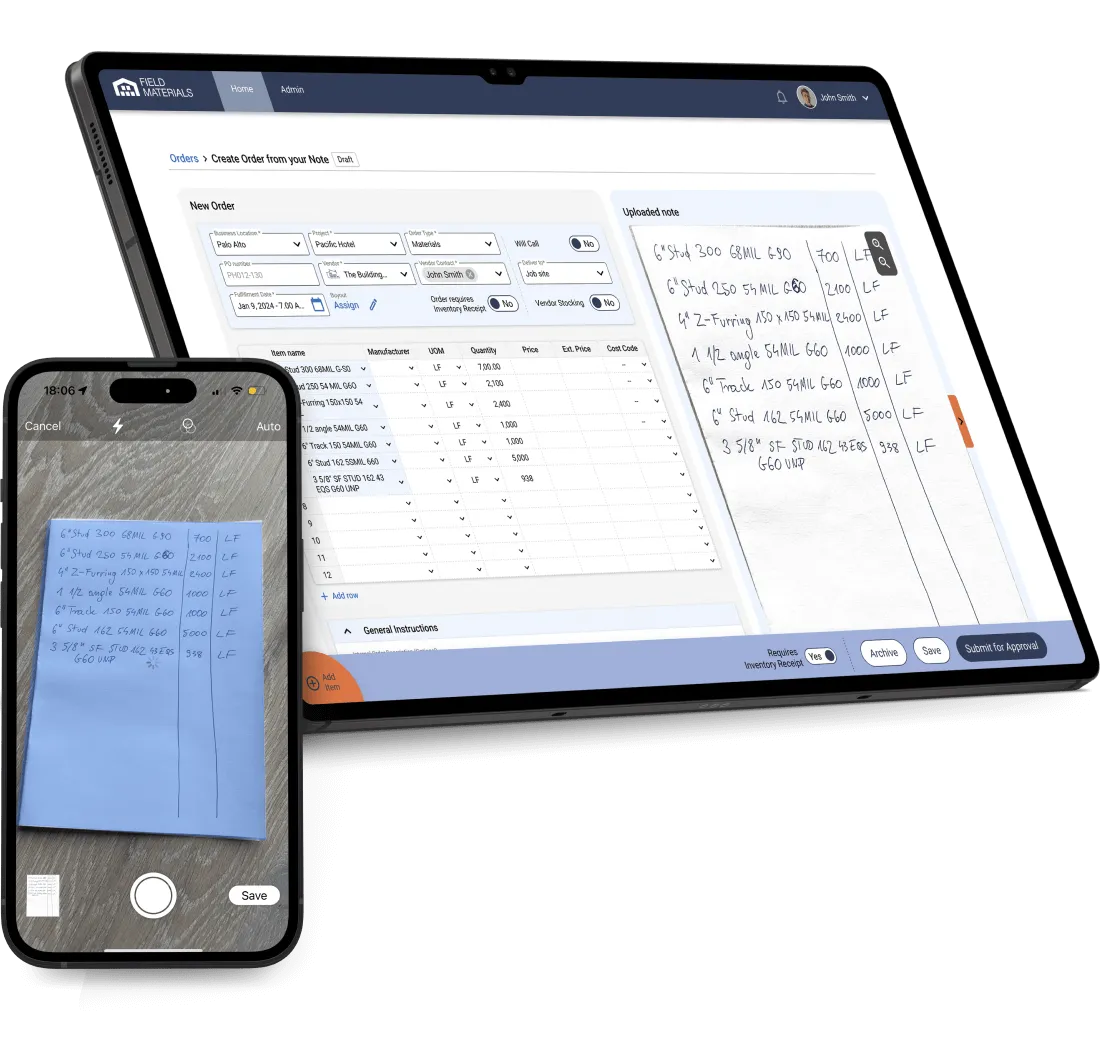
Our proprietary AI technology reads vendor quotes, automatically extracts all line items, and pushes POs into your accounting software.
Your field staff can request and access POs as well as upload packing slips and expense receipts through our iOS/Android app.
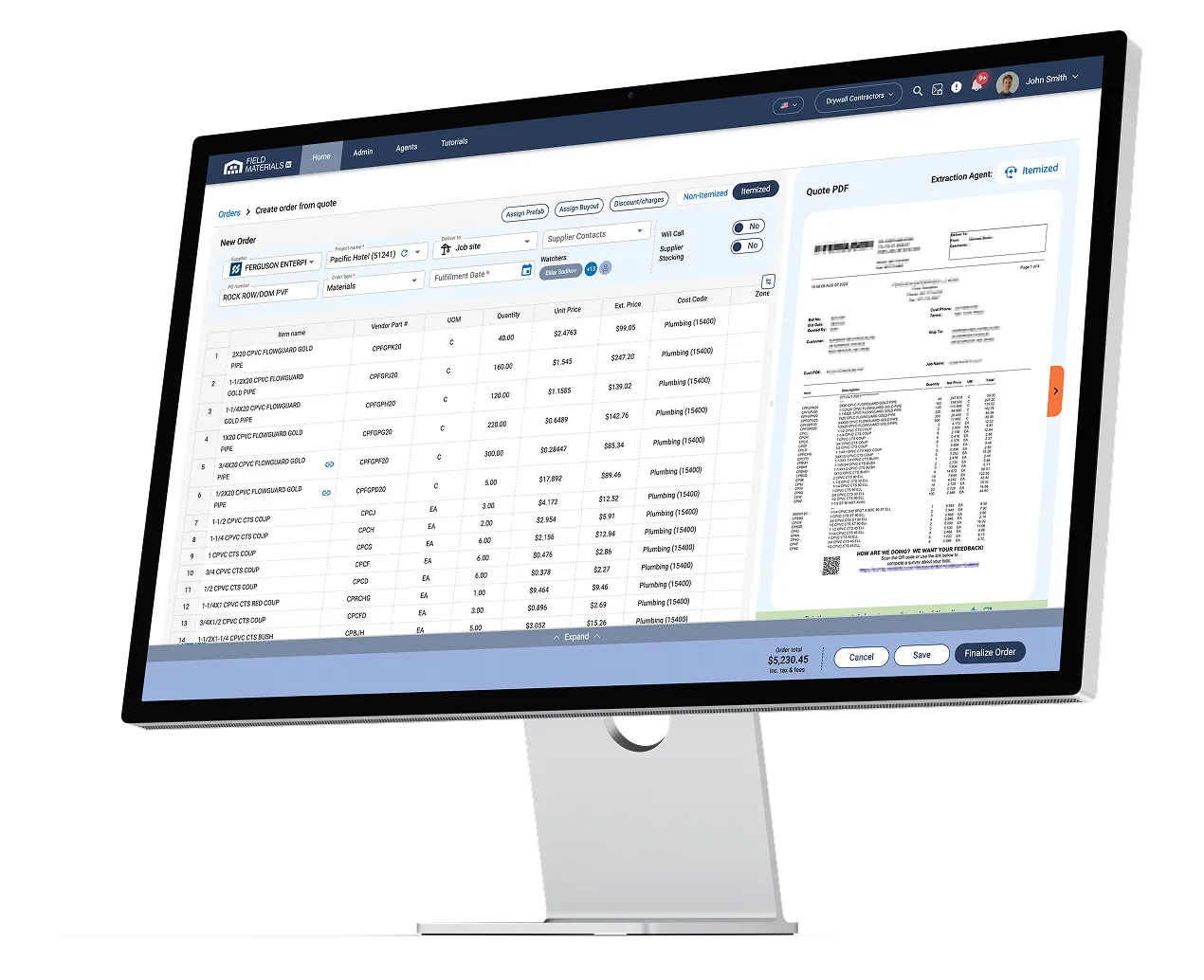
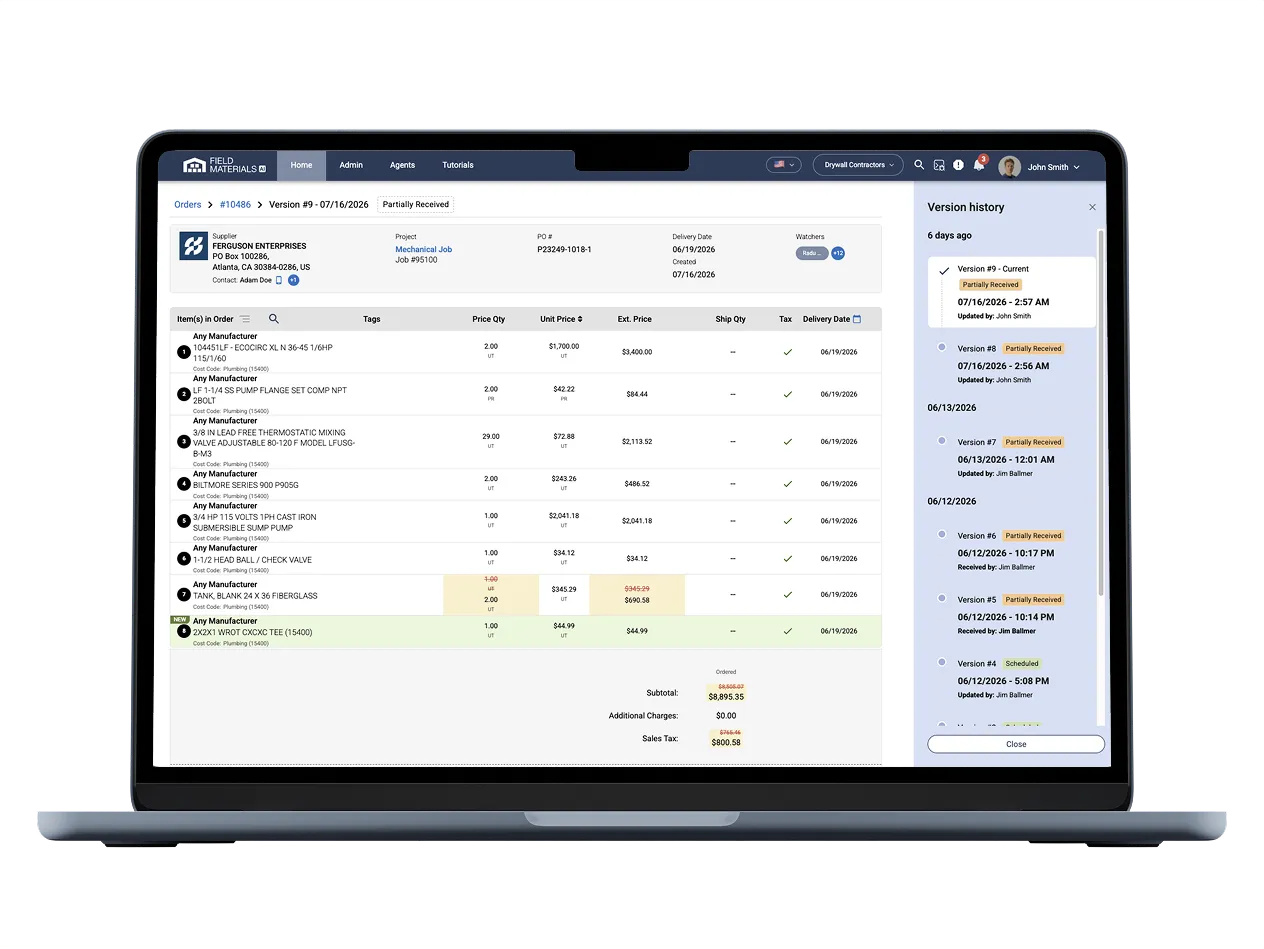
We built special support for price UOMs and ship UOMs and gracefully handle conversions between them. You can set up a buyout in MLF or MSF and then order materials by using individual units (e.g., studs, tracks, panels). Our system understands the sizing of each unit and easily converts the ship units to price units (MSF or MLF). You can configure this to your needs and use ship UOMs or price UOMs when processing delivery slips and invoices.
Budget control is probably one of the biggest benefits customers see. Instead of finding out about budget overruns at month-end, you get real-time visibility into spending as it happens.
The system pulls budgets from your ERP broken by cost code and cost type and tracks committed costs against those budgets as soon as the purchase orders are created and expenses are logged (e.g., receipts). If you're hitting budget limits on a particular cost code due to a particular PO, you will get notified about it.
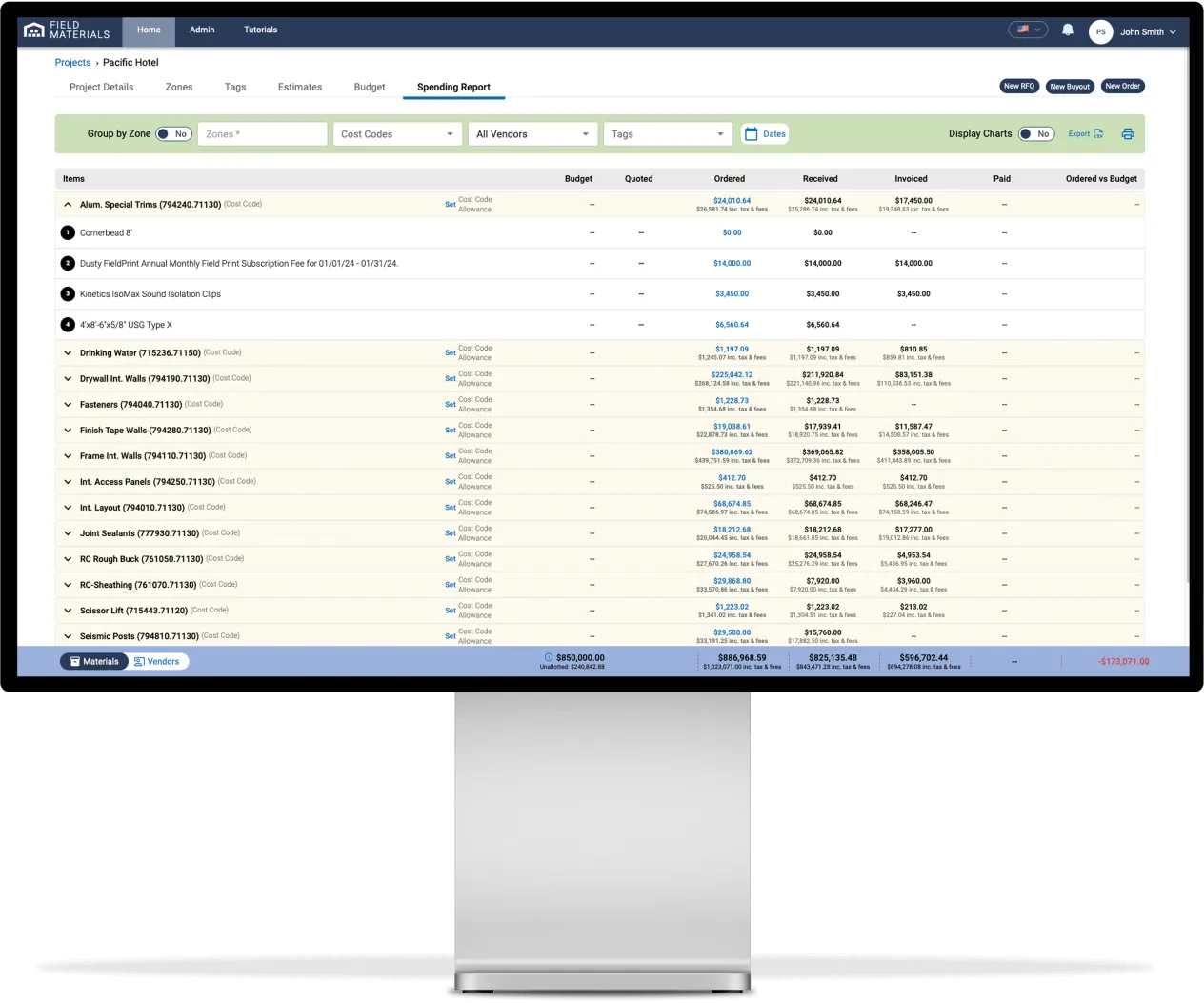
Project managers can see exactly where they stand financially at any point by accessing the Job Costs report that shows committed (ordered), received, invoiced, and paid costs for each project in real-time. Track these costs against either the budget synchronized from your ERP or against the uploaded bill of materials from your estimation software.
The reporting gives you visibility that most construction companies have never had before. You can see spending by project, vendor, cost code, even material/equipment, or time period. The job costs report shows what's been ordered, delivered, invoiced, and paid for the job at the material and unit level.
Budget versus actuals update in real-time as purchase orders are created and invoices are processed. You can drill down from high-level summaries to individual line items to understand exactly where money is being spent.
You also get detailed pricing intelligence: history of material prices throughout the year and recommendations of materials that would result in the highest potential savings based on your purchase volume and historical price volatility.
Reports can be exported to CSV, Excel, or PDF.
No, and this is really important because the last thing you want is to complicate your vendor relationships. Vendors don't need accounts, passwords, or special training. They send quotes and invoices the same way they always have - by email.
When there are issues with deliveries or invoices, the system emails vendors a secure link to respond, but they don't need to log in. They can upload corrected documents or respond to questions through the link.
The goal is to make your internal processes more efficient without creating extra work for the vendors you depend on.
Emergencies happen in construction, and we've built the system to handle them.
Field staff can use the mobile app to reserve a PO number without specifying the details. Field Materials will reserve the PO # in the ERP.
Field staff then gives the PO# to the vendor. When foremen or superintendents pick up such orders at the supplier location, they just need to take a photo of the packing slips. AI will read the slip to itemize the PO for review at the office.
In addition, field teams can also go to retail stores and buy something directly with a company card or personal card. In such cases, they just upload a receipt via the mobile app and are prompted to provide the job number for the expense and an optional cost code along with notes.
Even for emergency purchases, you still get the digital trail and proper job costs assigned, so nothing falls through the cracks from an accounting perspective.
This is completely configurable based on how you want to run your business. For each user, you can configure whether they can see prices or not. Some companies want their field teams to be cost-conscious, so they show pricing and budget information. Others prefer that field teams focus on getting the right materials without worrying about costs.
You can set it up either way. Field teams might see that certain materials are pre-approved at specific pricing, or they might just see quantities and descriptions. Project managers always have access to full cost information and can see budget impacts in real-time.
Yes, Field Materials lets users easily record and report delivery issues for PO items either on the desktop or mobile app:
The system generates a detailed email to the vendor. This creates a paper trail and gets the vendor working on a solution immediately. The system also alerts the project manager and office team so they know there's an issue that might affect the schedule.
It's much better than the old way where field teams would call or text about problems, and sometimes those messages would get lost or forgotten.
Field Materials offers both an iOS and Android app (available in English and Spanish) that allows users to:
The app works offline too, which is important on job sites with poor cell coverage. Everything syncs up when they get back online.
Yes as long as the administrator enabled field roles to create orders.
Field Materials can easily support editing orders that were previously submitted to vendors:
There are several easy ways that Field Materials supports ordering new items that are not yet present in the item database:
We provide first-class support for rental POs. Customers usually create a separate line item for each equipment piece (e.g., scissor lift) in their POs. The price for each line item could be a lump sum dollar value or it could be a unit price tied to UOM like “days”, “weeks” or “months”. To indicate the end period for each line item, you can either use the end date on each line item or use time UOMs to indicate the duration (duration will be applied to the PO start date). Our system will notify you via email about the expiring rental when you reach either the item’s end date or the duration period after the start date (if you used time-based UOMs).
Additionally, you can run reports based on items’ end dates to see which POs have expiring rentals.
A buyout is an approximate volume of material you are committing to buy from a supplier at a specific price.
Yes, the system handles all types of procurement. For materials, you get the full workflow from RFQs and quotes to delivery slips and invoices. For equipment rentals, you can process rental agreements with automatic alerts before rental periods expire - no more surprise charges because someone forgot to return equipment. For services and subcontracts, you can track work orders.
The system is flexible enough to handle whatever types of procurement your business requires, from bulk materials to specialized equipment to subcontractor services.
Field Materials offers a highly customizable, enterprise-grade access control to data and actions users can take:
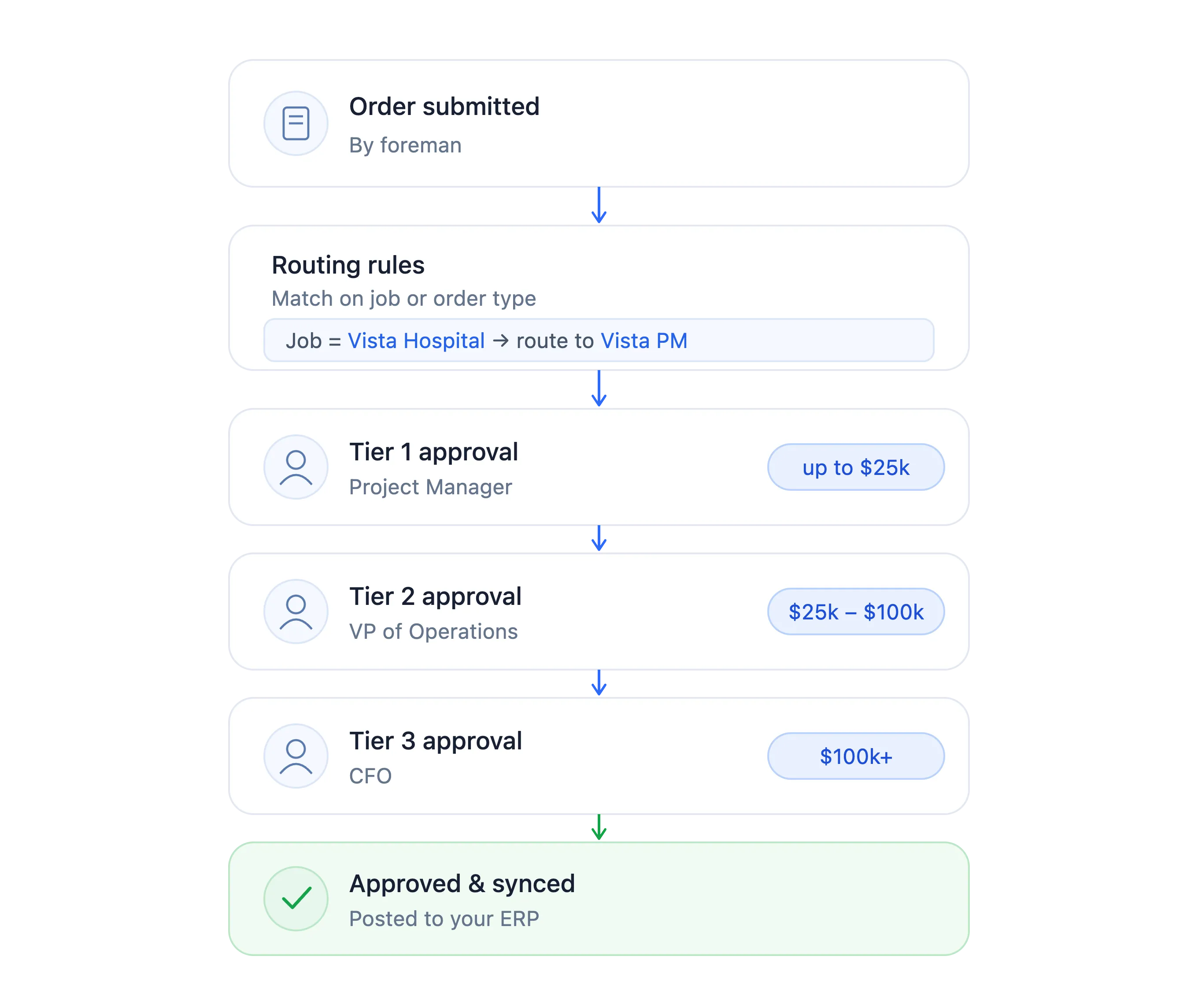
The approval system is really flexible because every company operates differently. You can set up different approval levels based on dollar amounts and job roles.
Orders
Invoices
For both orders and invoices:
Customers can update their approval settings at any time should their internal requirements change.
Yes, our multi-modal LLMs can process a wide range of vendor document formats without manual training (e.g., tabular, word documents, semi-structured). We custom-trained our Large Language Model on a variety of formats. The system automatically determines the best format for the document and applies the right model to it.
If you find a particular format that our AI technology does not handle, please contact your CSM and bring this to their attention. We can make sure to include your format in our training data sets.
We designed Field Materials to be an AI co-pilot that keeps the human in the loop. When the AI is uncertain about something, it highlights it for your review. You might see a line item flagged because the AI couldn't confidently read the description or pricing.
You can quickly correct anything the AI missed, and those corrections help train Field Materials AI for the next time. Even if there are some documents that are not read correctly, customers typically see about 90% reduction in manual data entry. The AI catches the vast majority of discrepancies that could cost you money.

If you're using an ERP we don't currently integrate with, we can build custom integrations as long as your ERP has an API. The integration typically takes a few weeks to develop after you sign a contract with us.
We have built-in integrations with all major construction ERPs:
The integration is bi-directional, meaning we pull information from your ERP and push information back into it. We pull in your projects, vendors, cost codes, cost types, and budgets so everything's already set up when you start using Field Materials. When you create purchase orders or approve invoices in Field Materials, that information flows back into your ERP with full job and cost coding. Your accounting team doesn't have to do duplicate data entry.
If you're using an ERP we don't currently integrate with, we can build custom integrations as long as your ERP has an API. The integration typically takes a few weeks to develop after you sign a contract with us.
Current integrations include: