Construction Inventory Management Software

Inventory Management

Get instant visibility into your warehouse or yard inventory and empower your field staff to check and request inventory.

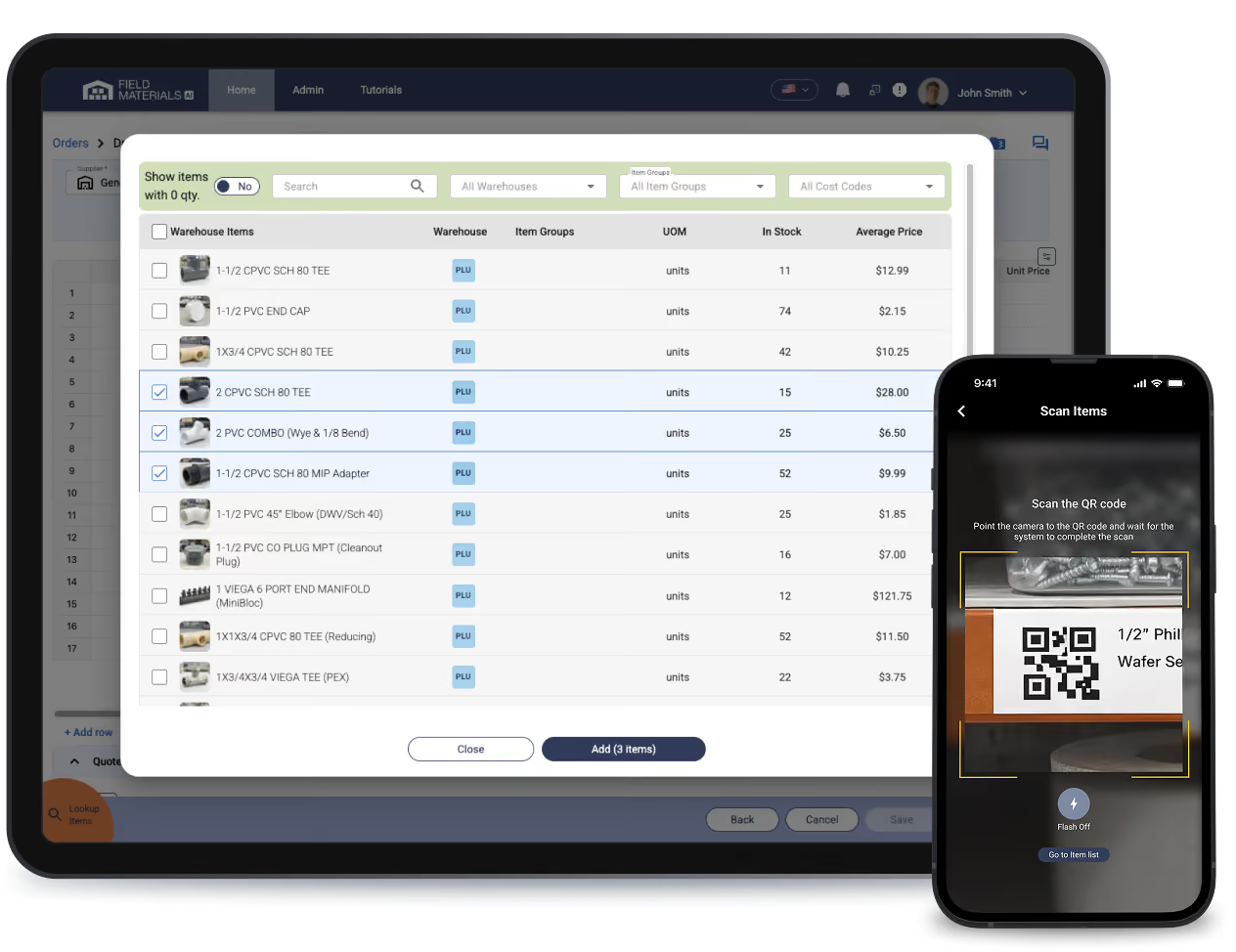
See general inventory and all job orders currently stored at the warehouse and request to ship inventory to the site using the mobile app.

Field Materials inventory module provides instant visibility into your warehouse inventory.

How Inventory Management Software for Construction works

Field staff uses Field Materials mobile app to check and request inventory from the warehouse.
  • Warehouse manager enters your warehouse inventory
  • Track the full ledger of inventory transactions: re-stock orders, transfers of leftovers from jobs, manual adjustments, transfers between warehouses
  • Field staff uses the mobile app to check and request inventory from the warehouse
  • Warehouse manager confirms the orders submitted to the warehouses and schedules deliveries or pickups
  • Purchasing manager can split field requisitions between warehouse and vendors (system will automatically flag items present in the warehouse)
  • Set minimum thresholds for all inventory items and get notified when stock is low

Best construction inventory management software

Stay organized and empower your teams

Field Materials inventory module tracks the full ledger of inventory transactions: re-stock orders, transfers of leftovers from jobs, manual adjustments, transfers between warehouses
  • Keep your inventory organized: track all your warehouse stock, including job inventory stored in the warehouse
  • Empower your field teams: use the mobile app to check real-time warehouse inventory and request items from the warehouse
  • Streamline re-stocking of warehouse inventory based on minimum thresholds

See the best inventory management software for construction in action

See Demo

FAQ

Why use construction inventory management software?

  • Real-time visibility across multiple sites: whether it’s physical warehouses or job sites, it’s important for field crews to be able to check in real-time what’s available at each location. 
  • Financial accuracy and cost control: manual spreadsheets often get stale because data does not get updated and cannot be accessed by the field staff. 
  • Waste reduction and sustainability: unused materials often end up as "dead stock" that eventually goes to a landfill. Having a record of what’s available makes it easy to utilize this stock and avoid material waste. 
  • Material cost savings: by tracking and automating re-stocking of materials that are volatile in price during the down season, you avoid high prices during the peak season.  

What are some of the features of construction inventory management software?

Some features to look for in a construction inventory management software are:  

  • Mobile app accessibility: field crews can use their phones to track and request inventory from the warehouse as well as take pictures of delivery slips and report delivery issues. 
  • Support for multiple sites and multiple jobs: construction inventory management software needs to support more than one warehouse and track inventory specific to different jobs. 
  • Full ledger of transactions: audit trail of all transactions as well as track prices for all inflows and use accounting principles for outflows (e.g., first-in-first-out principle). 
  • Automated alerts for reordering: inventory management software for construction should support minimum thresholds, send out notifications when stock falls below the thresholds, and automate re-ordering. 
  • Mobile Barcode/QR Scanning: Field crews use phones to scan materials as they arrive or are used. This eliminates manual entry errors and ensures the system updates instantly.

Field Materials customers also report that AI agentic features and pricing intelligence are some of the other most important features they look for in construction inventory management software. 

How does job inventory work?

  • Create a separate warehouse and assign it to the project (in the Project Details tab)
  • Any orders placed for this job and delivered to the warehouse will be stocked to this new warehouse (set Track in Inventory toggle to Yes as part of your Order Type settings)
  • When you are ready to request job site deliveries, create a new order, choose the Job Inventory Warehouse as the supplier, and add items from the Job Inventory Warehouse.
  • Orders set to be delivered to the Job Inventory Warehouse will be counted only once in the job cost report (deliveries to the job site won’t be counted).
  • You can always move items from the job warehouse to the main warehouse or from the job site back to the job warehouse when needed.

What can you do with FM construction inventory management software?

The inventory module lets you track general inventory of materials stored in your warehouse as well as materials stored in a warehouse for a specific job. You can see what's in the general stock, what's stored for specific jobs, and all the scheduled inflows and outflows.

Field teams can check inventory from their phones before making trips back to the warehouse. When placing orders, the system can show what's available in stock versus what needs to be ordered from vendors.

When you set up job warehouses, field staff can check what has been delivered to the warehouse for a specific job. This is important for projects where there is not enough space to store materials at the job site and the majority of materials are shipped to the warehouse. When the field crews are ready to receive the materials at the job, they request job-specific inventory via the mobile app and handle such requests as regular orders (tracking received items, etc.).

Here is the full list of inventory management functionality:

  • Easy set up of warehouses with associated inventory via a simple file upload
  • Transfer inventory between warehouses
  • Transfer leftover inventory from a specific job to the warehouse
  • Place inventory restocking orders for the warehouse
  • Monitor scheduled inventory inflows and outflows
  • Have min restocking thresholds for each item with automated notifications when inventory is low for a particular item

What can you do with the Field Materials mobile app?

Field Materials offers both an iOS and Android app (available in English and Spanish) that allows users to:

  • See the jobs they’ve been assigned to
  • Submit field requisitions for these jobs to be approved by the designated office staff
  • Order items from pre-approved buyouts
  • See all orders on their jobs
  • Receive orders on site by taking snapshots of packing slips and capturing any delivery issues
  • Reserve a PO number to provide to vendors in case of Will Call orders. When the slip is uploaded for such POs, AI will read the slip to itemize the PO for review at the office. This way, when the invoice is sent, you can easily verify what was purchased (cost code can be optionally provided by field staff when reserving a PO).
  • Take a photo of a purchase receipt or invoice and submit it for approval
  • See inventory availability in the company warehouse (if inventory module is active)
  • Submit an order request for warehouse inventory
  • Respond to an invoice kickback: approve or provide commentary

The app works offline too, which is important on job sites with poor cell coverage. Everything syncs up when they get back online.