Construction Purchase Order Software

Purchase Orders

Eliminate data entry to cut your PO processing time by 90%. Field Materials automatically syncs POs to your accounting software.

Your field staff can request and access POs as well as upload packing slips and expense receipts through our iOS/Android app.
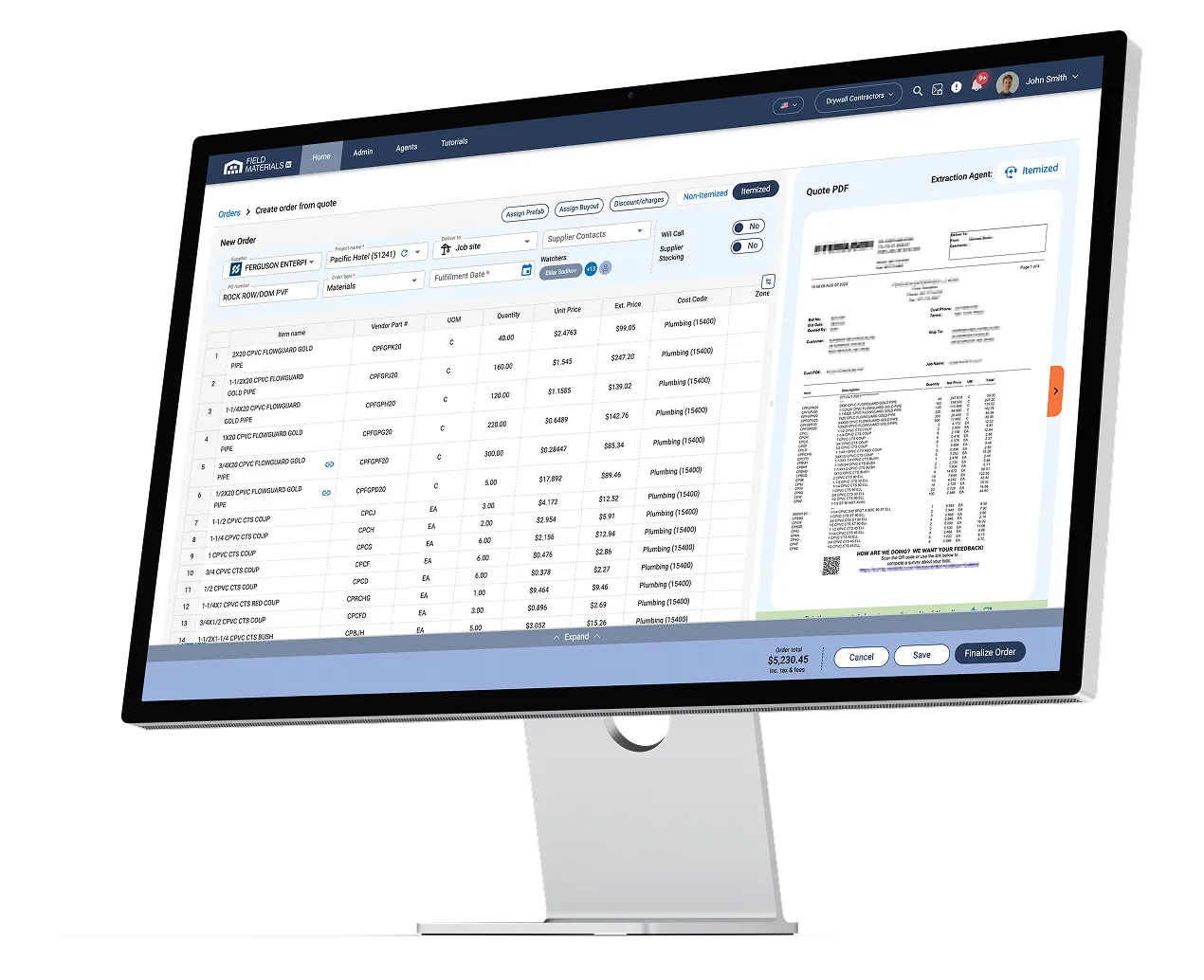
Use AI to itemize a PO from a vendor quote PDF in seconds

How construction purchase order software works

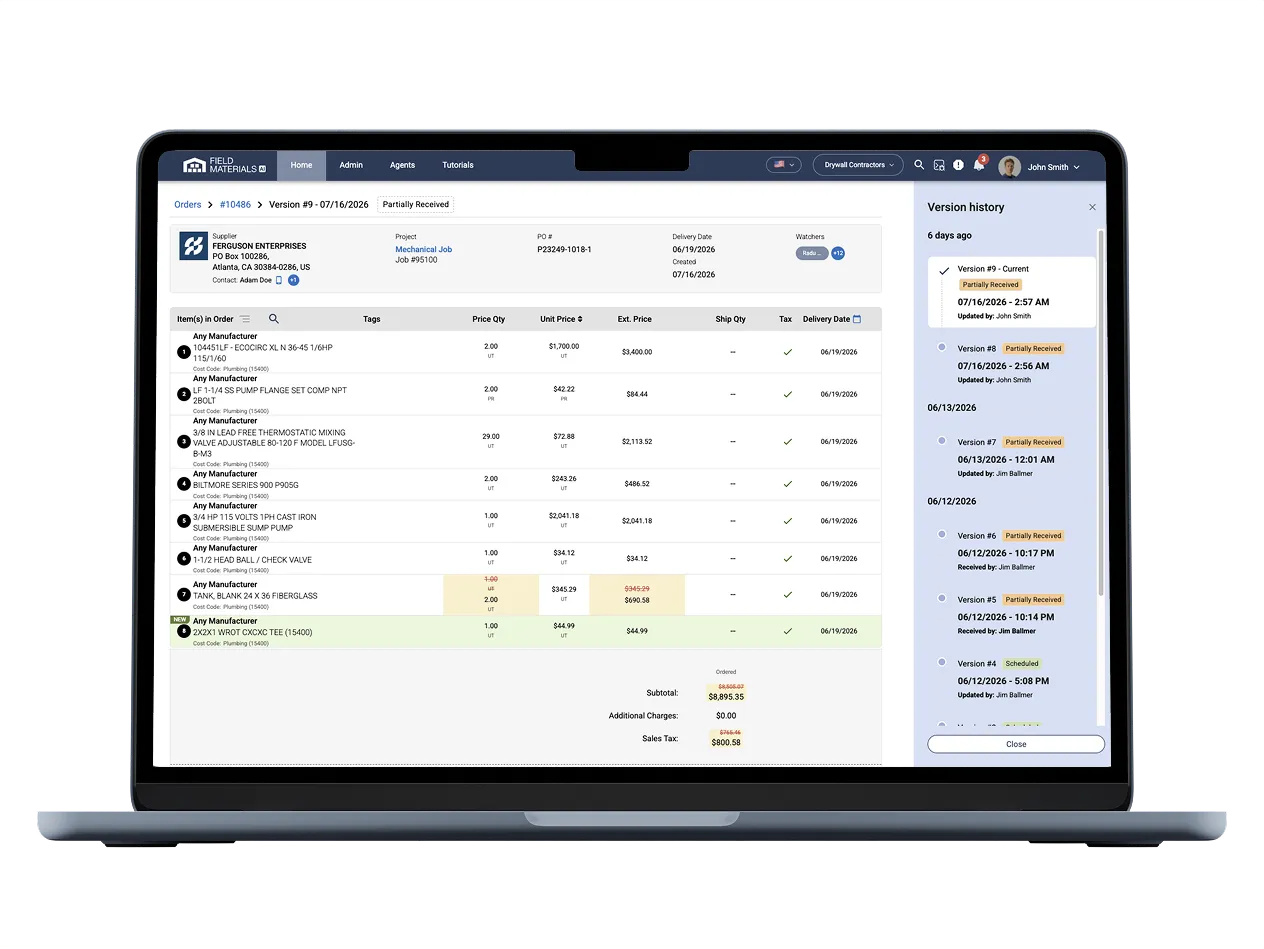
Field Materials POs support multi-tier approvals and auditable version history.
  • Create an approval flow for your material purchases, rentals, or subcontracts. Office reviews and easily splits orders between vendors and warehouses.
  • Remove manual data entry when requesting materials from the field or creating POs in the office. POs can be automatically synced to your ERP.
  • Empower field staff to reserve a PO number for will-call orders without calling the office.
  • Message your team or the vendor from the mobile app or web. Email or SMS replies are also logged. All communication for a PO is in one place.
  • Control what each user can access and see. Assign users to projects and locations/branches, or as watchers to individual POs.
  • Automate the audit trail of all changes made to each PO. See highlighted changes made by each user.

Field requisitions and POs with no manual data entry

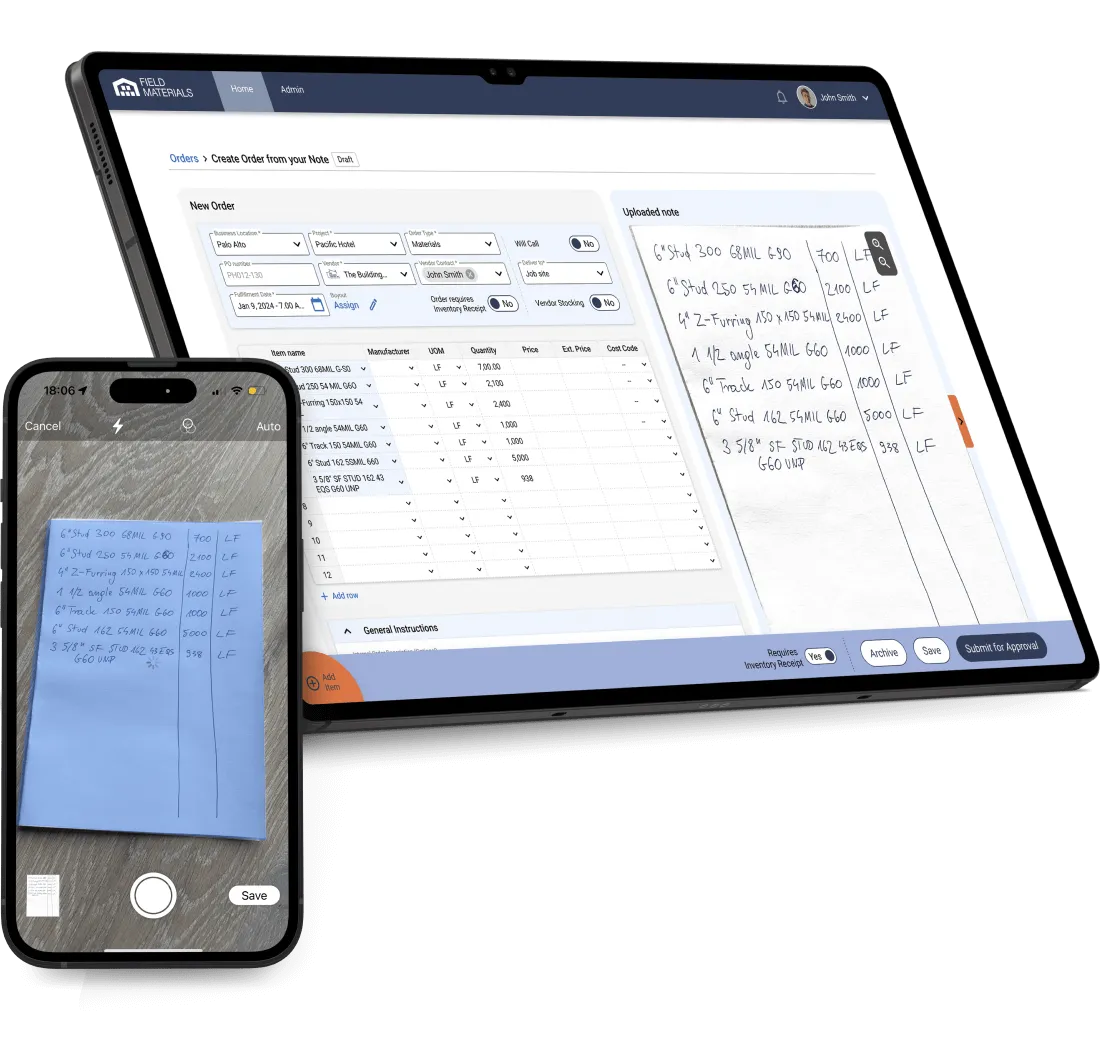
Field Materials reads hand-written requisition forms, supplier quotes, or delivery slips to itemize POs.
  • Field crews can select items from the project's BOM, an existing buyout, or your company catalog of materials.
  • Field staff can walk the site and type or dictate notes with the materials they need. AI will match them to your material catalog and create an itemized PO.
  • If you use requisition forms, field staff can just snap a picture of the form. AI will read the form and itemize the PO.
  • If you have a supplier quote PDF, just upload it and AI will itemize it for you with units of measurement, quantities, and prices.
  • For Will Call orders, Reserve a PO with the mobile app. No need to call the office. When picking up the order, foreman snaps a photo of the slip. AI reads it and itemizes the PO.

Control purchasing with customized approvals

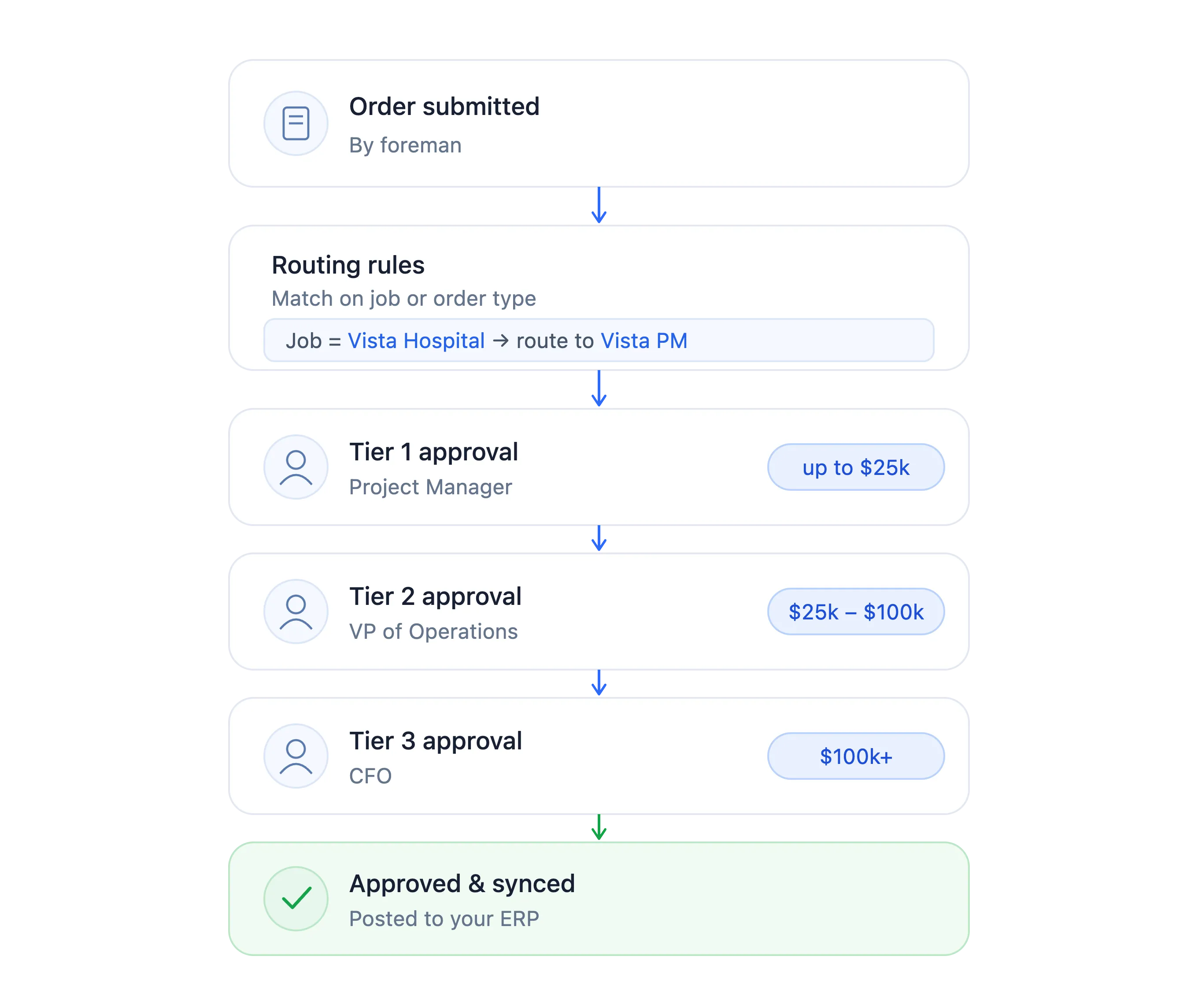
Field Materials lets you define rules for order approvals with up to 3 tiers of approvals and escalating thresholds.
  • Define rules for who can create, approve, or require approval for orders based on their role in the company
  • Up to 3 tiers of approvals with escalating thresholds 
  • Define exceptions for orders placed from buyouts or orders from the warehouse
  • Set up exceptions for reserving PO numbers for will-call orders

ROI of AI-native construction purchasing software

It saves time and money

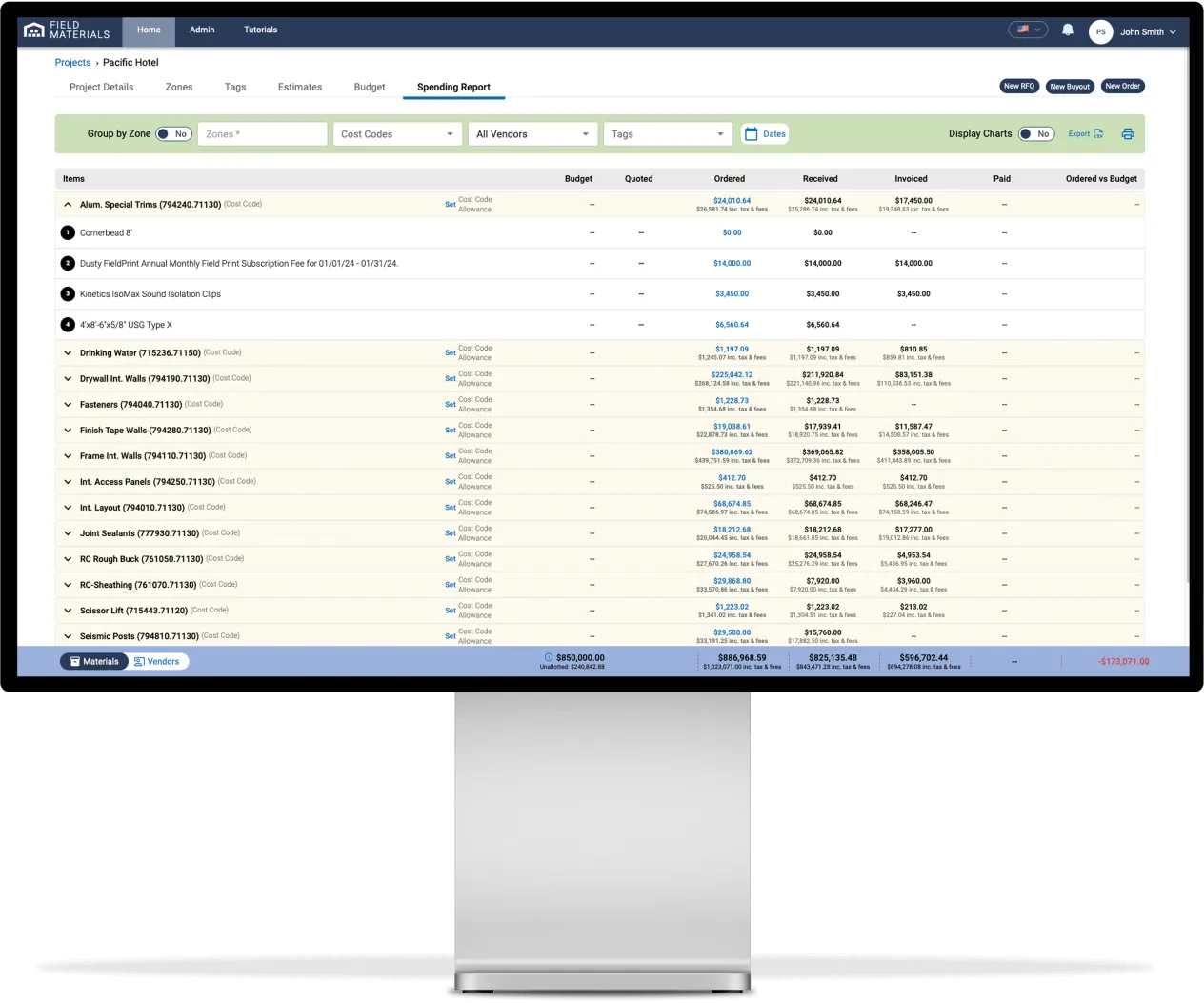
See real-time job cost reports with the breakdown of ordered, received, and invoiced amounts.
  • Eliminate data entry: AI itemizes POs by reading quotes, dictated notes, handwritten requisition forms, emails, or delivery slips. 
  • Cut down rogue spending through approvals and better visibility into will-call orders.
  • Avoid paying retail prices by empowering your field teams to order from vendor-negotiated buyouts.
  • Cut PO and invoice processing time by 90% through a seamless integration with your ERP.
  • Catch billing errors by automating the
    3-way match to verify invoices against POs. 
  • Manage all purchasing records and related communication in one place. Make it easy to audit purchases.
  • Provide visibility into procurement to avoid project delays and minimize errors (i.e., duplicate orders, delivery issues).

See the best construction purchase order software in action

See Demo

FAQ

What are the benefits of purchase order software for construction?

  • Prevent "maverick" spending by ensuring every PO is approved before it goes out to the supplier. 
  • Automate workflows replacing manual emails and paper forms ensuring the right managers are notified for approvals
  • Enable 3-way match: automatically compare the PO, delivery slip, and invoice to ensure you pay only for what you received at the prices you were quoted. 
  • Enable audit trails: access all documents and the history of every transaction to see who approved POs and invoices and be ready for audits.
  • Mobile Accessibility: teams in the field can create or approve requisitions on the go and upload docs to prevent bottlenecks.

Field Materials AI users also report 90% reduction in the time creating and processing purchase orders. 

What are some of the features of construction purchase order software?

Some features to look for in a construction purchase order software are:  

  • Requisitions & PO creation: empower your field staff to easily submit a requisition for needed materials or reserve a PO.
  • Approval workflows with rules for who needs to approve the purchase orders under different dollar thresholds.
  • Financial controls to verify expenses against job budgets and 3-way match between the PO, delivery slips, and invoices. 
  • Vendor Management: ability to add new vendors and their contacts and track which suppliers deliver on time and which ones frequently have quality issues. 
  • Reporting and Analytics: detailed reports on which materials are purchased most frequently from which vendors. 
  • Audit trails for all the changes made to each PO and all the approvals. 

Field Materials AI customers also note that automating data extraction from documents and removing data entry into the ERP are some of the most important features they look for in construction purchasing software.

How does Field Materials support urgent purchase orders (Will Call orders)?

Emergencies happen in construction, and we've built the system to handle them.

Field staff can use the mobile app to reserve a PO number without specifying the details. Field Materials will reserve the PO # in the ERP.

Field staff then gives the PO# to the vendor. When foremen or superintendents pick up such orders at the supplier location, they just need to take a photo of the packing slips. AI will read the slip to itemize the PO for review at the office.

In addition, field teams can also go to retail stores and buy something directly with a company card or personal card. In such cases, they just upload a receipt via the mobile app and are prompted to provide the job number for the expense and an optional cost code along with notes.

Even for emergency purchases, you still get the digital trail and proper job costs assigned, so nothing falls through the cracks from an accounting perspective.

Can field teams submit material requisitions or create their own purchase orders?

Yes as long as the administrator enabled field roles to create orders.

  • Use a mobile app or a tablet to submit material requisitions using the list of items from:
    • A pre-approved buyout
    • Bill of materials
    • Database of items from all previous orders
    • Hand-filled material requisition forms (scanning accuracy is subject to handwriting legibility)
  • Filter items by keywords, groups or cost codes to help quickly narrow down the list of items in a large buyout or bill of materials.
  • Reserve a PO for Will call orders. Provide the PO# to the vendor and take a photo of the packing slip. AI will read the slip to itemize the PO for review at the office.

How does Field Materials handle PO change orders?

Field Materials can easily support editing orders that were previously submitted to vendors:

  • When editing orders, users can:
    • Add new items to the order or eliminate previously ordered items
    • Change ordered quantities, units of measure, cost codes
    • Change the order delivery date and destination
    • Assign delivery dates to specific items to be different from the main order delivery date
  • The vendor will receive an email clearly outlining all changes that the user made to a previously submitted order.
  • Project members will be notified of the changes (as long as they have notifications turned on)
  • All changes will be saved as part of the system audit trail
  • Any changes made to the order in Field Materials will be recorded in the ERP as a change order (supported in most ERPs but not all).

How does Field Materials support buyouts?

A buyout is an approximate volume of material you are committing to buy from a supplier at a specific price.

  • Use a supplier quote to create a buyout.
  • Place orders from the buyout with pre-defined prices and individual delivery dates.
  • See at the line item level how much you ordered and received so far against the buyout quantity.
  • Empower your field team to order from a pre-approved buyout and vendor to help control costs.
  • Use tags and / or zones to assign orders to job areas or phase (e.g., floor 1, Zone A).
  • Field Materials will automatically verify item pricing when you review and approve invoices.

How does Field Materials handle different types of purchase orders - materials, rentals, subcontracts?

The system handles all types of procurement. For materials, you get the full workflow from RFQs and quotes to delivery slips and invoices. For equipment rentals, you can process rental agreements with automatic alerts before rental periods expire - no more surprise charges because someone forgot to return equipment. For services and subcontracts, you can track work orders and process AIA invoices against them with built-in support for retainage.

The system is flexible enough to handle whatever types of procurement your business requires, from bulk materials to specialized equipment to subcontractor services.

Does Field Materials support approvals for purchase orders and invoices?

Field Materials offers a highly customizable, enterprise-grade access control to data and actions users can take:

  • Assign specific roles to users (project manager, foreman, accountant, etc.)
  • Assign users to projects to control their access to specific jobs (accountant, admin, purchasers have access to all jobs).
  • Based on the assigned roles, control what users can do within each job:
    • Edit orders
    • Upload delivery slips and receive orders
    • Review invoices
    • See prices

The approval system is really flexible because every company operates differently. You can set up different approval levels based on dollar amount thresholds and job roles.

Orders

  • Enable up to 3 role-based approvers (Owner, PM, Purchaser, etc.) before orders are submitted to vendors and exported to the ERP.
  • Set up optional Order Amount Thresholds (e.g., >$1,000 requires PM approval, >$10,000 requires owner approval) before orders are submitted to vendors and exported into the ERP.

Invoices

  • Enable role-based approvers (Owner, Accountant, PM, etc.) to control who can approve invoices before these are posted to the ERP.
  • Set up optional invoice amount thresholds that will notify the designated roles to approve invoices.
  • Set up optional maximum invoice amounts that the designated roles will be able to approve.

For both orders and invoices:

  • Approvers receive real-time notifications (email, text, and in-app) about the need to approve a specific order or invoice.
  • Field Materials keeps an audit trail of who requested orders and who approved orders and invoices.

Customers can update their approval settings at any time should their internal requirements change.