Construction Invoice Reconciliation Software

AP Invoices

Automate 3-way match and save 5-10% in material costs by catching price and quantity errors in invoices with AI.

Cut 90% of invoice processing time by eliminating manual cost coding and data entry of invoices into your ERP / accounting software.

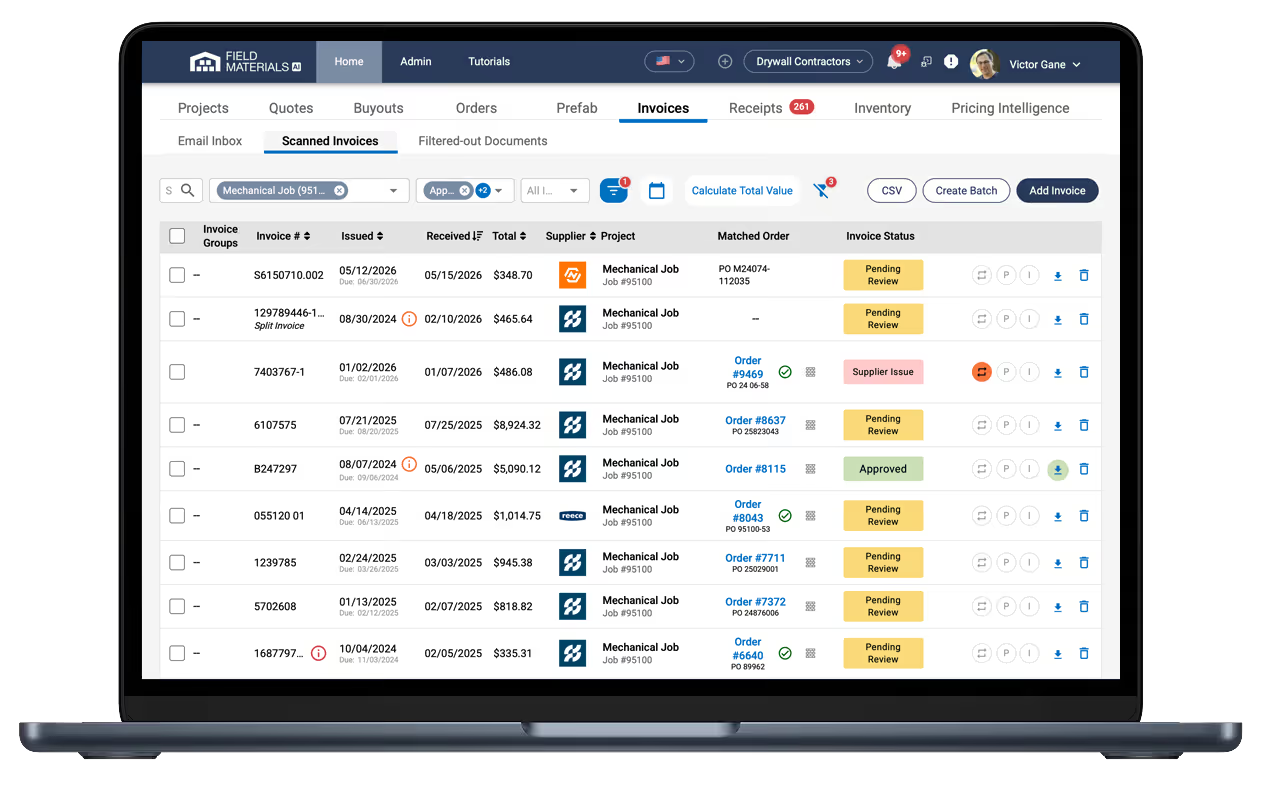
Field Materials scans vendor invoices from your email and checks them for accuracy.

The most reliable construction invoice software

How it works

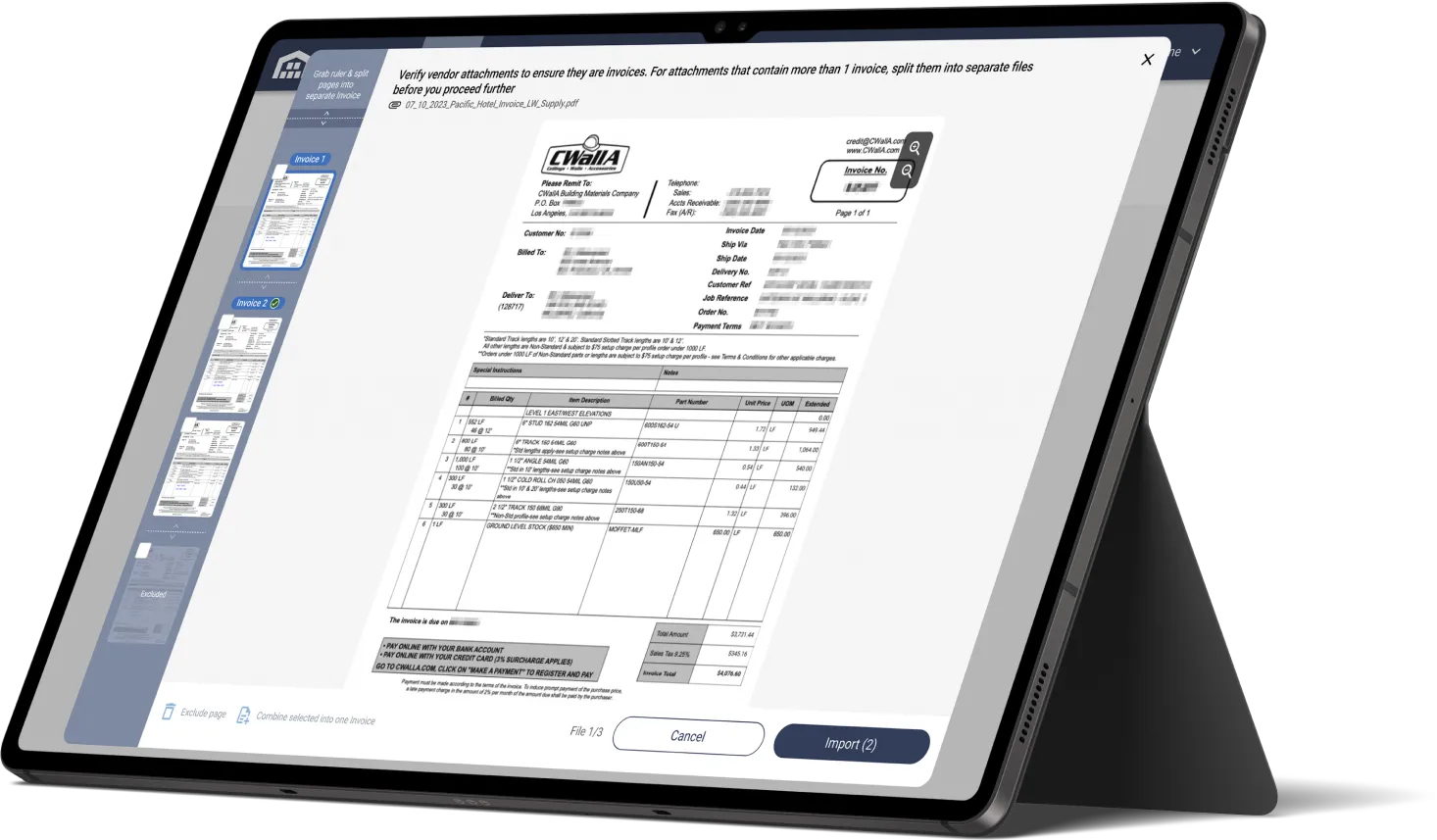
Field Materials downloads invoices from email, splits attachments into individual invoices, and automatically matches invoices to POs.
  • Supplier emails the invoice
  • AI automatically downloads, scans, and matches the invoice to an existing purchase order
  • AI automatically verifies the invoice accuracy and highlights issues that can be kicked back for internal review or to the supplier
  • System notifies appropriate project manager for approval
  • Our platform syncs approved invoices to your accounting / ERP system eliminating any data entry

AI-native construction invoice management software

It saves time and money

Field Materials syncs approved invoices to your accounting / ERP system eliminating any data entry.
  • Save 5-10% in material costs with AI that catches price and quantity errors in invoices
  • Reduce 90% of invoice processing time with AI that eliminates manual steps to enter invoices, match them to POs, cost code them, and verify them 
  • Stay organized by keeping orders, proof of delivery, and invoices in one place.

See construction’s best invoice reconciliation software in action

See Demo

FAQ

What are the benefits of invoice reconciliation software in construction?

  • Prevent financial leaks: invoice reconciliation software automates 3-way matching to compare the invoice, the purchase order, and received quantities. It helps contractors catch billing errors that drain profit margins.
  • Faster "closing" and better cash flow. Manual reconciliation can take weeks as invoices sit on a project manager's desk. AI invoice reconciliation software automates verification of invoices and routes them to the right person for approval based on the job code or PO number. By cutting processing time from weeks to days, contractors can take advantage of early payment discounts.
  • Real-time job costing: software automates and dramatically cuts invoice processing time so that project managers can see "committed costs" vs. "actual costs" in real-time instead of having to wait until closing of the fiscal period. 
  • Streamline complex billing: for complex AIA invoices with retainage, progress billing, and change orders, invoice reconciliation software automatically calculates the retainage and accurately tracks amounts due.

What are the features of invoice reconciliation software in construction?

Some features to look for in a construction invoice reconciliation software are:  

  • Automated support for email inbox: ability to download invoices from email and split the attached files into invoices. 
  • Automated 3-way match: read the invoice and match to the right PO, compare the invoiced quantities and prices to PO quantities and prices and verify invoiced quantities against received quantities (extracted from proof of delivery records). 
  • AI reading capabilities: it’s important for AI to read not just the invoice number, the invoice total, and the invoice date, but extract all the line items, quantities, prices, taxes, and even understand things like retainage and discount terms. 
  • Automated approval and kickback workflows: appropriate project managers should be notified and AP team should have the ability to kickback an invoice to other team members or vendor. 
  • ERP integration: ability to write invoices to the ERP as a direct job cost, against a PO, general GL expense, or equipment expense and ability to detect duplicate invoices that have been previously exported. 

Does AI invoice reconciliation software support invoices sent via email?

Yes, Field Materials AI automatically processes incoming emails, downloads the attachments, and splits the attachments into individual invoices. Invoices are then matched to the appropriate jobs and purchase orders and are automatically verified against them. If you have any invoices that are arriving through physical mail, you can take a picture of such invoices and easily upload them as a PDF or image either on desktop or via our mobile app.

How does Field Materials handle overhead or equipment service expenses (invoices and receipts)?

Yes, in addition to the invoices posted against POs and direct job cost invoices, we support:

  • Overhead invoices posted directly against GL accounts (we support this a special overhead job and cost codes mapped to GL accounts)
  • Receipts for corporate card expenses posted as AP payment records (supported for some ERPs)
  • Receipts from personal cards posted as AP entries to be paid to employees

To make coding of such expenses very efficient, we built in several automation shortcuts:

  • Assignment of vendors to the default cost code and GL account
  • GL account routing based on the Order Type
  • Assignment of Default project for overhead invoices and expenses

How does Field Materials handle invoices without POs?

Our system supports posting invoices as a direct job cost. Here is how you handle such invoices:

  • You create a new order record from the invoice content
  • AI reads invoice issue date, due date, subtotal, tax, etc. and assign it to the new order
  • AI will usually auto-select the job and the vendor for the invoice and even assign default cost code (based on the vendor setup or historical invoices). You can correct it if you need to.
  • If you want to itemize the invoice and assign parts of it to different cost codes, you can easily have AI itemize the invoice and split it across several cost codes.
  • Or alternatively, assign the invoice or individual line items to specific overhead GL accounts.

How does Field Materials handle construction AP invoices?

Field Materials AI automatically downloads email attachments from the invoice email inbox. It reads each PDF or image file and automatically separates the file into individual invoices.

Any role designated to approve invoices can:

  • Review invoices that were automatically matched to POs
    • AI automatically identifies and highlights issues (e.g., invoice prices not matching quoted prices, invoicing backordered items)
    • Users can kickback an invoice with issues to the vendor or internal team members
    • Users can easily reference other corresponding invoices and packing slips for the given PO all in one screen
  • Review invoices that were not matched to POs
    • Use AI to scan the invoice to create a new order record
    • Easily job-code and cost-code the new order record
    • Or alternatively assign it to a specific overhead GL expense account

What support does Field Materials have for equipment rental POs and invoices?

Field Materials AI provides first-class support for rental POs. Customers usually create a separate line item for each equipment piece (e.g., scissor lift) in their POs. The price for each line item could be a lump sum dollar value or it could be a unit price tied to UOM like “days”, “weeks” or “months”. To indicate the end period for each line item, you can either use the end date on each line item or use time UOMs to indicate the duration (duration will be applied to the PO start date). The system will notify you via email about the expiring rental when you reach either the item’s end date or the duration period after the start date (if you used time-based UOMs).  

Additionally, you can run reports based on items’ end dates to see which POs have expiring rentals.

Does Field Materials support approvals for purchase orders and invoices?

Field Materials offers a highly customizable, enterprise-grade access control to data and actions users can take:

  • Assign specific roles to users (project manager, foreman, accountant, etc.)
  • Assign users to projects to control their access to specific jobs (accountant, admin, purchasers have access to all jobs).
  • Based on the assigned roles, control what users can do within each job:
    • Edit orders
    • Upload delivery slips and receive orders
    • Review invoices
    • See prices

The approval system is really flexible because every company operates differently. You can set up different approval levels based on dollar amount thresholds and job roles.

Orders

  • Enable up to 3 role-based approvers (Owner, PM, Purchaser, etc.) before orders are submitted to vendors and exported to the ERP.
  • Set up optional Order Amount Thresholds (e.g., >$1,000 requires PM approval, >$10,000 requires owner approval) before orders are submitted to vendors and exported into the ERP.

Invoices

  • Enable role-based approvers (Owner, Accountant, PM, etc.) to control who can approve invoices before these are posted to the ERP.
  • Set up optional invoice amount thresholds that will notify the designated roles to approve invoices.
  • Set up optional maximum invoice amounts that the designated roles will be able to approve.

For both orders and invoices:

  • Approvers receive real-time notifications (email, text, and in-app) about the need to approve a specific order or invoice.
  • Field Materials keeps an audit trail of who requested orders and who approved orders and invoices.

Customers can update their approval settings at any time should their internal requirements change.